Compress PDF to a target file size
Reduce a PDF to 100KB, 200KB, 500KB, 1MB or 2MB for online forms and upload portals.
Smaller targets may reduce image quality.
Which target size should I choose?
Start with the upload limit you were given. If the compressed PDF looks too soft, try the next larger target.
- 100KBStrict forms
Use for very small upload limits where file quality is less important.
- 200KBApplications
Useful for application forms, certificates and simple text PDFs.
- 500KBCommon portals
A practical starting point for many upload portals and admin forms.
- 1MBImage PDFs
Choose when scanned pages or images need to stay clearer.
- 2MBEmail/files
Best when you need a smaller PDF but still want better visual quality.
After compression, compare the original size, compressed size and percentage reduction before you download. The file does not download automatically, so you can review the result first.
We measured what this tool actually does.
We ran three very different PDFs through this exact compressor and recorded the real before-and-after sizes. These are the figures the tool returned, not estimates.
| Sample PDF | Original | At 100KB | At 500KB |
|---|---|---|---|
| Photo-heavy report (4 pages) | 11.06 MB | 96 KB | 455 KB |
| Colour scanned letter (3 pages) | 7.16 MB | 76 KB | 450 KB |
| Born-digital text PDF (3 pages) | 5 KB | already under | already under |
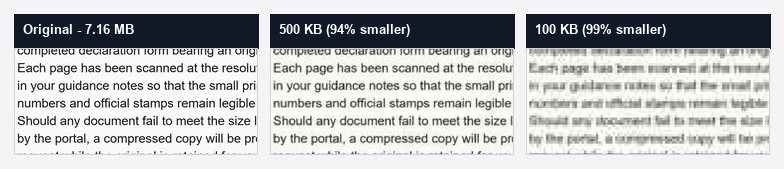
Large files shrank by over 90% while staying readable, which is why 500KB is our recommended first target. See the full test across every target, or check real upload size limits for email and portals.
Upload, choose a target, then download.
- 01
Upload PDF
Choose a PDF from your device or drag it into the upload area.
- 02
Choose target size
Select the file size required by your form, email or upload portal.
- 03
Compress
Review the result and download the smaller PDF when it is ready.
PDF compression FAQ
Is PDF Size Reducer free?
Yes. You can compress PDFs online without creating an account.
What target sizes can I choose?
You can choose common target sizes from 100KB to 2MB. Smaller targets may reduce image quality.
Will compression reduce PDF quality?
Sometimes. Image-heavy or scanned PDFs may look less sharp at smaller target sizes. Always review the compressed PDF before submitting it.
What happens if my PDF cannot reach the selected size?
Some PDFs are already optimised or cannot reach very small targets without heavy quality loss. If that happens, the tool returns its best effort above the target rather than hiding the miss. Read what to do when 100KB is not reachable.
What types of files can I upload?
Upload PDF files only. The current maximum upload size is 50MB.
Does the file download automatically?
No. The compressed PDF is shown as ready first, and you choose when to download it.
How long does compression take?
Compression typically takes 1–3 seconds. The first request after a quiet period takes longer while the server wakes, and larger files can take longer.